Every GHS user is familiar with the ADD command, which is the usual means
of introducing fixed weights.
The simplest form of the command adds a point weight at a given center of gravity.
For example, adding one ton of crew and effects,
ADD "CREW & EFFECTS" 1.0, 35.0f, 0.0, 12.0
Larger weight items might be distributed (for the purpose of strength calculations).
The ADD command provides a convenient way of spreading a weight uniformly over a
longitudinal distance:
ADD "NETS" 15.0, 20.0a, 0, 17.0 /LENGTH:20.0
If a more detailed distribution is desired, a weight curve can be specified:
ADD "ICE" 0.15 @ 55f, 0.3@23f, 0.2@22f, 0.1 @ 40a, 0, 10.0
(This one has four points. Many more weight-density points can be given.)
Or if a simple trapezoidal distribution will suffice where the center
and ends are known, let the program find the densities:
ADD "RATS" 0.1, 0, 0, 3 /LENGTH:40f, 30a
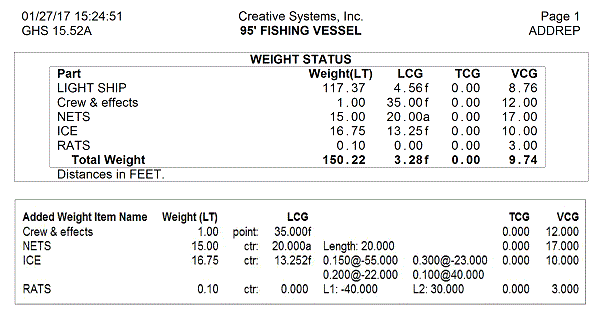
The STATUS command provides a report of these "fixed" weight items, but
only the center of gravity is mentioned -- nothing about the longitudinal distribution.
If you want to show the distribution, the ADD REPORT command does it.
Below is a comparison: first the STATUS FIXED output then the ADD REPORT output.
|